
Snapback: Download All Your Google Photos
Without Takeout
Free Chrome extension that downloads your entire library directly from photos.google.com — including shared albums that Google Takeout skips.
Why Skip Google Takeout?
Google Takeout is the official way to export your photos, but it was designed for data portability compliance — not for people who actually want to use their photos afterward.
Requesting a Takeout export takes hours. Downloading it takes even longer, and large exports frequently fail mid-download with no way to resume. What you get is a pile of zip files stuffed with JSON sidecar files that no photo app understands.
The native Google Photos download button is capped at 500 photos per batch — fine for a vacation album, useless for a 50,000-photo library. And if you want to download photos that someone else shared with you? Takeout can't export shared albums at all. Those photos are simply left behind.
Snapback takes a different approach. It downloads photos directly from photos.google.com in your browser — one click, original quality, including shared albums. You can pause and resume anytime, and files are organized into date-based folders automatically.
What Snapback Downloads For You
Shared albums included
Downloads photos shared with you by others — something Google Takeout can't do. Select "Shared with me" and download them all at once.
Original quality
Downloads photos and videos at their original resolution — no re-compression.
Auto-organized folders
Files sorted into YYYY/MM folders automatically.
Pause and resume
Stop anytime and pick up where you left off. Session history included.
Live Photos & motion photos
Handles all photo types, including Live Photos and motion photos.
Metadata as JSON sidecars
Dates, GPS, descriptions, and favorites saved as JSON files — compatible with Google Takeout format.
Free up Google storage
Optionally delete backed-up photos from Google Photos after downloading.
Snapback vs Google Takeout
| Snapback | Google Takeout | |
|---|---|---|
| Shared albums | Yes | No |
| Setup time | Seconds | Hours |
| Download method | Direct from browser | Zip file archives |
| Pause & resume | Yes | Start over |
| Folder organization | YYYY/MM automatic | Album dumps |
| Needs terminal / rclone | Not needed | Often, for large libraries |
| Price | Free | Free |
| Original quality | Yes | Yes |
How to Download Google Photos Without Takeout
Install
Add Snapback to Chrome from the Web Store. It's free, takes seconds, and doesn't require an account.
Download
Open photos.google.com and click the Snapback icon. Your photos download directly to your computer, organized into date folders.
Fix metadata
Run your files through Metadata Fixer to embed dates, locations, and descriptions so photos sort correctly everywhere.
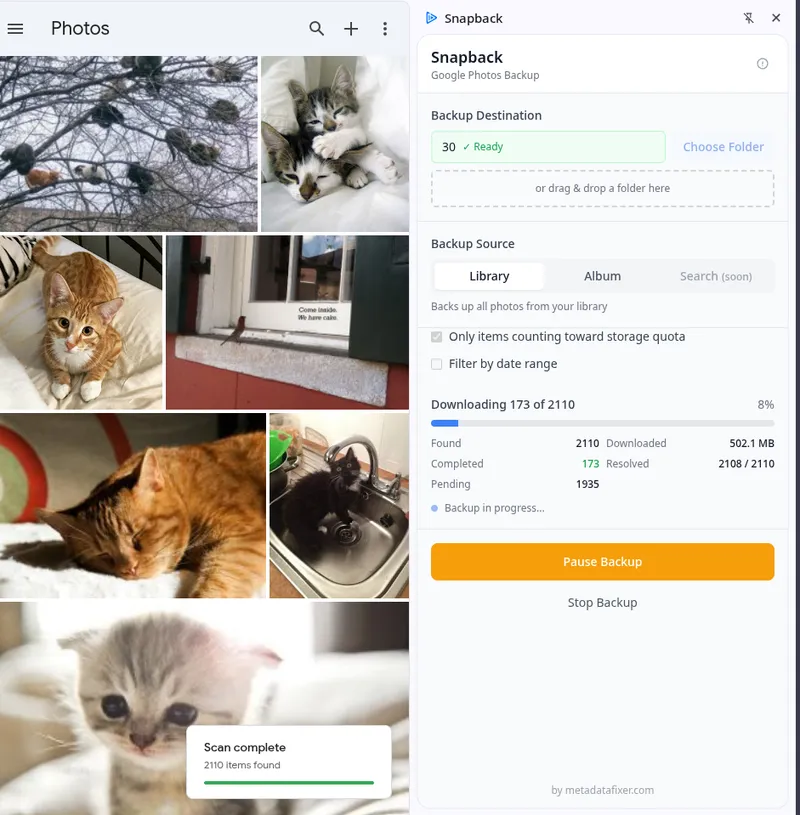
Snapback downloading a library of 2,110 photos directly from photos.google.com
About metadata
Downloaded files may have incorrect dates or missing GPS data. Snapback saves all metadata alongside your photos as .json sidecar files — compatible with the Google Takeout format.
If you need dates, locations, and descriptions embedded back into the files themselves (so they sort correctly in other apps), Metadata Fixer does exactly that.
What Snapback users say
“The extension and metadata fixer app is a lifesaver!!”
“It has been a Google Photos Download Lifesaver!”
“Snapback plug-in, it’s fantastic.”
Frequently Asked Questions
Is Snapback really free?
Yes, 100% free. There is no account to create, no usage limits, and no premium tier. Install it from the Chrome Web Store and start downloading immediately.
Does Snapback download shared albums?
Yes — select the Album tab, click "Shared with me," and download them all at once. See our shared albums guide for the full walkthrough.
Does Snapback download photos in original quality?
Yes. Snapback downloads the same original-quality file that Google Photos stores — the same resolution, the same format, no re-compression.
Can I download my entire Google Photos library?
Yes. Snapback downloads your full library, not just 500 photos at a time like the native Google Photos download button. You can pause and resume anytime — it picks up where you left off.
What's the difference between Snapback and Google Takeout?
Snapback downloads photos directly from your browser with no waiting — no zip files, no multi-hour export preparation. It also downloads shared albums, which Takeout cannot do. Both are free and deliver original-quality files.
Do I still need Metadata Fixer after using Snapback?
Snapback saves metadata as JSON sidecar files alongside your photos. If you want dates, GPS locations, and descriptions embedded into the photo files themselves — so they sort correctly in Apple Photos, Lightroom, or a NAS — run the files through Metadata Fixer after downloading.